Floorp v12.21.0 is now available. This release updates the Firefox base to 159, adds workspace and tab synchronization, and fixes issues affecting everyday browsing.
💝 Support Floorp through Stripe
You can now support Floorp through Stripe from our donation page, without creating a Floorp account. Choose a one-time or monthly contribution, select an amount, and continue to Stripe's checkout page. Card details are entered on Stripe's side.
Your support helps sustain Floorp's ongoing development and operations and build a foundation for future work.
🔄 Firefox 159 base update
The Firefox base has been updated to the 159 series.
☁️ Synchronize workspaces and tabs
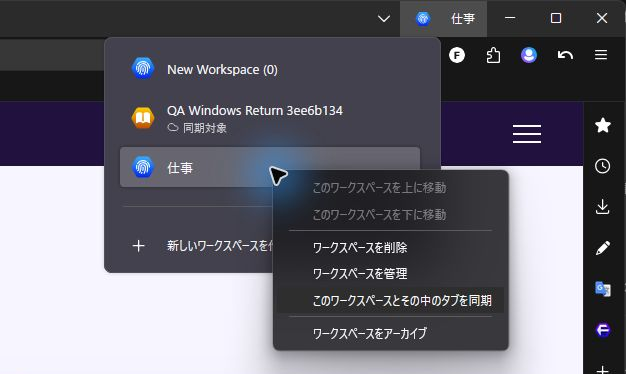
Japanese interface shown.
Bring selected workspaces, including their names, icons, and web tabs, to other Floorp installations syncing with the same Mozilla Account.
Click the workspace name in the upper right to open the list, then right-click the workspace you want to sync. Choose Sync This Workspace and Its Tabs to start syncing it. Existing workspaces are not uploaded until you select them. A status indicator identifies selected workspaces and lets you inspect the reason when synchronization needs attention.
This workspace-sync feature covers regular web tabs. Private windows, local files, and internal browser pages are excluded. This feature does not synchronize form contents, cookies, or container assignments.
🛠️ Bug fixes
- Restoring Tab Stacks: fix Tab Stacks failing to initialize correctly when multiple windows are restored from the previous session.
- Minimum tab width in stacks: apply the minimum tab width setting to tabs inside Tab Stacks as well.
- Tab switching and containers: fix tab switching from the command palette, keep commands targeting the same tab after reordering, and preserve tab position when reopening in another container.
- Command palette choices: fix choices sometimes disappearing just after selecting a command and entering its input step.
- Tab context menus: correctly arrange Floorp's additional menu items in the standard and alternate layouts.
- Closed tabs and windows: preserve unrelated closed-tab and group history when private-tab data is cleared, and keep Undo Close Tab batch counts consistent.
- Bookmarks and containers: open bookmarks from the bookmarks toolbar in new tabs using the current workspace's container, while preserving any explicitly selected container.
- Tab sleep exclusions: apply the exclusion settings loaded at startup when tabs navigate later.
- Release notes after updates: honor the choice not to open release notes automatically. When automatic opening is enabled, avoid opening both the Blog home page and the version's release notes.
- New tab initialization: fix an initialization error when Floorp Start is enabled.
- Status bar: clean up redundant observers left active when the status bar is repeatedly turned on and off.
- Web apps on Windows: prevent delayed work from recreating a web app's shortcut or registration after uninstall.
- Editing and saving notes: reflect incoming content in the open note and preserve changes when updates overlap with typing, or when Notes closes immediately after a title change or deletion of the final note. Also prevent unwanted conflict copies caused by local title or body edits.
- Notes synchronization: fix older sync data overwriting unsynced edits made offline or in another Notes window, including when Notes is closed. Keep deletions consistent and retry failed saves without replacing newer synced content.
- Workspace sync reliability: keep sync paused while Workspaces is disabled. Preserve incoming tab destinations while pages load or need to be retried, instead of replacing them with an older URL.
📥 Download
The release is available from Floorp's official download page and GitHub Releases.
Download Floorp
GitHub Releases
Please report bugs and suggest features through Floorp's GitHub Issues.