

v12.17.0 Release Notes: Tab Stacks and Container Support
Release notes tell you what's new in Floorp. For changes introduced by Firefox, please check the Firefox Release Notes.
The Floorp Projects welcomes your feedback. You can submit bug reports and feature requests on GitHub, where you can also view the source code used for this release.
We would like to express our special thanks to all the developers, users, and contributors who made this release possible.
Floorp v12.17.0 is now available.
This release adds Tab Stacks for organizing tabs into groups, the ability to choose a container when opening a URL from the command palette, and a workspace icon picker. We also improved Zen Mode and mouse gestures to make it easier to organize tabs and work with them.
Download Floorp
GitHub Releases
✨ Highlights
Tab Stacks
We added a two-level tab organization feature based on Firefox's native tab groups.
Tab groups appear as a single chip on the tab bar, and the tabs in the selected stack can be switched from the second horizontal bar. Tabs in a stack can be selected, reordered, and closed from the second bar.

Tab Stacks are disabled by default. To use them, enable them in Settings → Tabs & Appearance → Tab Stacks, then restart Floorp.
If you prefer the existing Firefox-style tab group display, you can switch each tab group back to the normal display.
Choose a container from the command palette
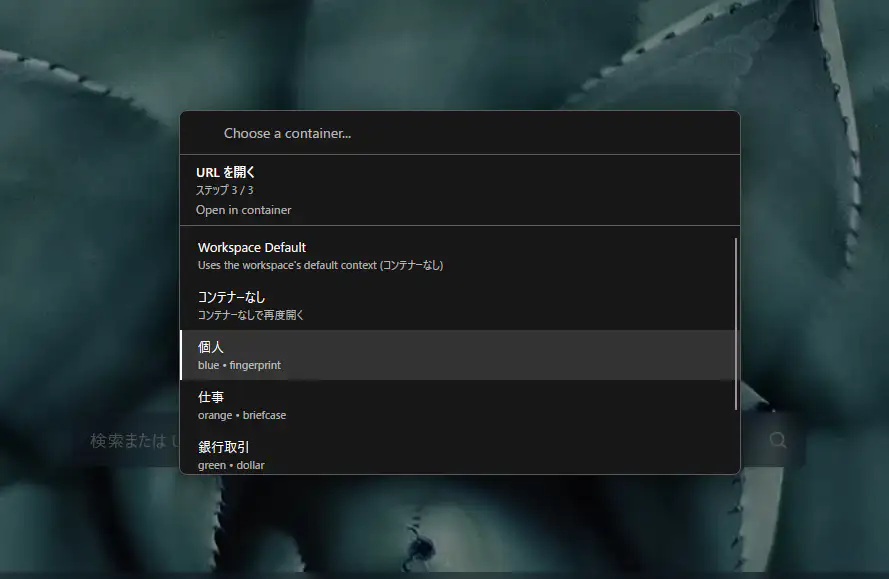
The command palette's "Open URL" command now lets you choose which container to use when opening a URL.
You can choose the workspace's default container, no container, or any of your registered containers. This is useful when you want to open the same site in different containers, such as work and personal.
Search results opened from "Search Web" now also use the current workspace's default container.
Workspace icon picker
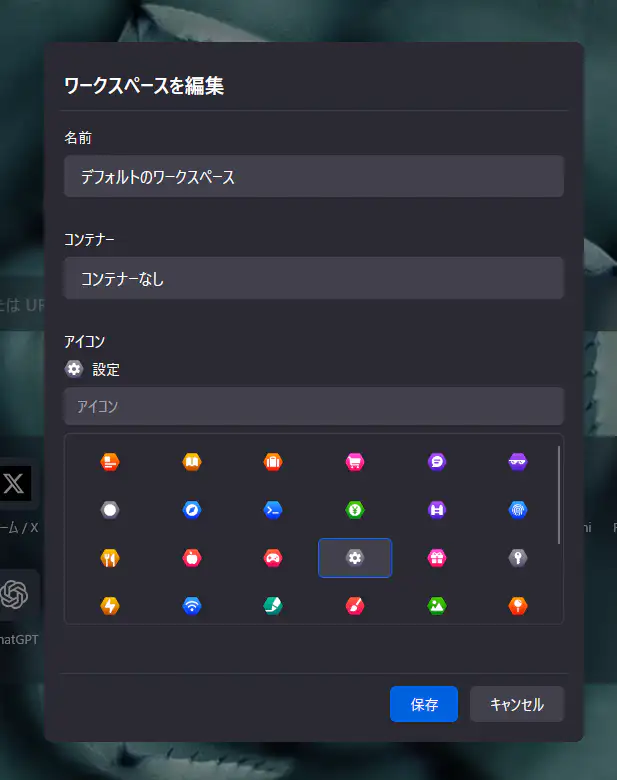
You can now choose a workspace icon from a searchable icon picker.
There are 34 icons to choose from, with keyword search support. Previously used icon names continue to work.
Zen Mode improvements
Zen Mode's toolbar and status bar are now displayed as overlays that do not change the page layout.
This means that showing or hiding the Zen Mode UI no longer moves the page content. Zen Mode state is also managed independently for each window, so commands from the menu, toolbar, and mouse gestures are correctly applied to the window they belong to.
Tab and window behavior settings
You can now choose where links that request a new window should open from Settings → Tabs & Appearance → Tab and window behavior.
The following three options are available:
- Current window or tab
- New window
- New tab
On Windows, we also added a setting to show tab previews on the taskbar. This setting only changes the taskbar display; it does not create new browser windows.
Keyboard shortcut improvements
The keyboard shortcut configuration format has been updated to support more key codes.
Actions such as moving a window or toggling Zen Mode can be assigned to shortcuts. Existing shortcut settings are migrated to the new format.
🧪 Opt-in features
The following features are disabled by default. To use them, set the corresponding preference to true in about:config.
Hover to reload background tabs
When floorp.tabs.hoverReload.enabled is enabled, a reload button appears on a background tab when you leave the mouse pointer over it for 700 milliseconds.
Clicking the reload button reloads the page without switching to the tab.
Edit a tab URL
When floorp.tabs.inlineUrlEdit.enabled is enabled, Edit tab URL is available from a tab's context menu.
You can edit a URL without activating the tab, making it faster to move or reuse tabs. If needed, you can assign a dedicated shortcut from the keyboard shortcut settings.
🛠️ Improvements and bug fixes
- Improved mouse gesture execution latency, responsiveness, and reliability.
- Fixed an issue where rocker gestures could select text or open the context menu.
- Fixed an issue that prevented switching between multiple tabs with the wheel while holding the right mouse button.
- Added the ability to customize wheel gesture assignments.
- Fixed multiple display and interaction issues when using multi-row tabs.
- Fixed an issue where using shortcuts on editable content could lose text being entered.
- Fixed an issue where the last tab shown for each workspace was not preserved correctly.
- Fixed session restoration involving private containers. Regular tabs, pinned tabs, workspaces, tab groups, and split views are preserved, while private container URLs and history are not saved in restoration data.
- Fixed an issue where settings screens and dialog backgrounds could break when using a Firefox theme.
💖 Contributors
- @Walkmana-25 — container selection in the command palette
- @zakius — mouse gesture responsiveness improvements and rocker gesture fixes
- @greeeen-dev — multi-row tab fixes
- 100mountains — author of "derp", a browser developed as a fork of Floorp 12; original concept for Tab Stacks
Thank you to all the developers, users, and contributors who helped with this release.
For changes made in Firefox itself, please see the Firefox release notes.
Please report bugs and suggest features through Floorp's GitHub Issues.